How to jailbreak iOS 4.3.2 Using RedsnOw
Backup your iOS hardware before jailbreaking your iphone Device via itunes.
Before Proceeding You should Download These:
Download iOS 4.3.2 IPSW
Download Redsn0w 0.9.6rc12
Once your have restored your iOS hardware to factory default via Itunes, you can proceed to jailbreak :
1. Launch RedsnOw application recently downloaded.
2. Click on “Browse” and Select “iOS 4.3.2 IPSW”.
3. Make sure your device is plugged in to the computer and is switched off and then click Next.
4. Now, follow the on screen instructions to enter into DFU mode.
5. Now, the final step! Wait till Redsn0w ends the process and when the device reboots, you’re done!
you reboot the hardware you’ll need to perform a tethered boot through Redsn0w by launching the app
and selecting “Just boot tethered right now” and clicking ‘next.’

Next Step to Download Free APPs.
Installous 3.1.2 (not the discontinued install0us) has been released and is now available
for download via Cydia for jailbroken iDevices.
Step 1: You will first have to patch your Mobile Installation file on your jailbroken iPhone or iPad.
Step 2: Start “Cydia” on your iPad.
Step 3: Touch on “Manage” tab on the bottom.
Step 4: Now touch on “Sources” as seen in the screenshot below :

Step 5: Touch on “Edit”, and then on “Add”. You should now be prompted to enter a url source as
seen in the screenshot below. Type “http://cydia.hackulo.us” and click on“Add Source”.
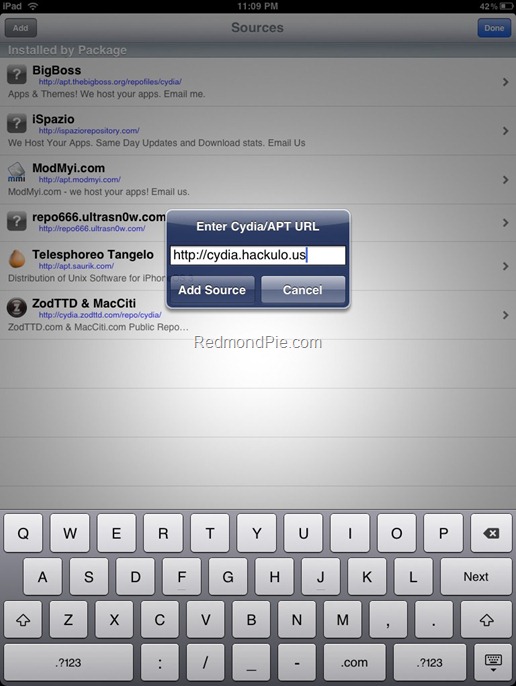
Cydia will now automatically update your sources by following a series of automated steps.
Step 6: After installation is completed. Search for “Installous” in Cydia and install this application on your jailbroken iPhone or iPad.

You should now be able to run installous manually on your iPhone or iPad in order to search or Free Apps.